


CalendPal: Calendar Planner
4.51.26K Reviews
App Specs
- Version
- Varies with Device
- Updated On
- License
- Free
- Downloads
- 10,000,000+
- Developer
- Dairy App & Notes & Audio Editor & Voice Recorder
- Categories
- Productivity
- Platform
- Android
Screenshots
 Analysis by AppCompare
I judge a calendar app less by how many boxes it can tick than by whether I can keep using it when my week gets messy. A planner should make the next step easier to see, not create another system I have to maintain. Calendar Planner - Agenda App is aimed at people who want their schedule and everyday planning close together, and it makes most sense when you value having a clear place to look before the day begins.
That distinction matters. A calendar is good at showing when something happens; a task list is better at showing what still needs doing. This app sits in the space between those habits. I would consider it if I often forget to connect a task with the time I have available, but I would not switch simply because I want the most powerful project-management setup. The best reason to try it is a practical one: fewer loose notes and a more visible routine.
Choose it for the planning habit you actually have
Before moving an existing schedule, I would decide what I expect to check most: a day at a glance, upcoming appointments, or a list of unfinished work. A calendar-centered planner can help when the first two are the problem. If my main difficulty is tracking a complicated project with many dependencies, I would look at a dedicated task or project tool instead. Matching the app to the source of the disorder is more useful than chasing a long feature list.
It is also worth thinking about how you plan. People who like to group personal appointments, study time, and recurring chores into one routine may appreciate a combined planner. Someone who already has a trusted calendar and only needs to capture quick notes may find a separate notes app less distracting. I would start with one ordinary week rather than trying to reorganize my entire life on day one.
First Impressions: Sleek and User-Friendly
Upon launching Calendar Planner - Agenda App, you'll immediately notice its sleek, user-friendly interface. It's like stepping into a minimalist's dream workspace. The layout is intuitive, with everything you need just a tap away. The color scheme is easy on the eyes, making it perfect for long planning sessions.
The onboarding process is a breeze. The app guides you through setting up your initial schedule and preferences. Even if you're not tech-savvy, you'll find the setup to be straightforward. The developers clearly put a lot of thought into making the experience as seamless as possible.
Features That Stand Out
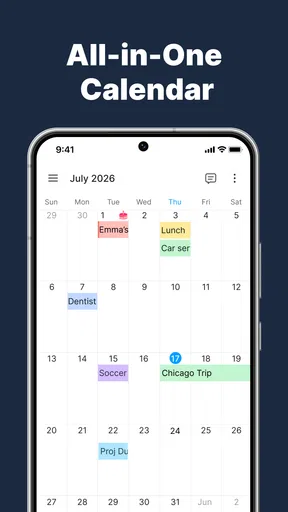
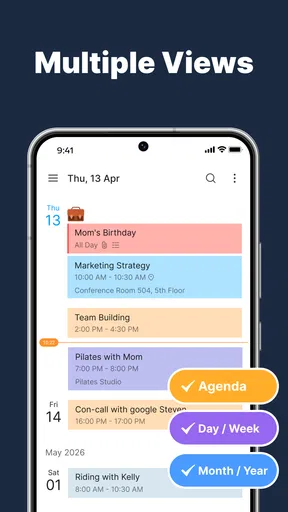
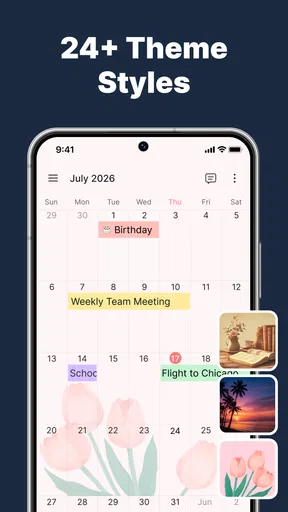
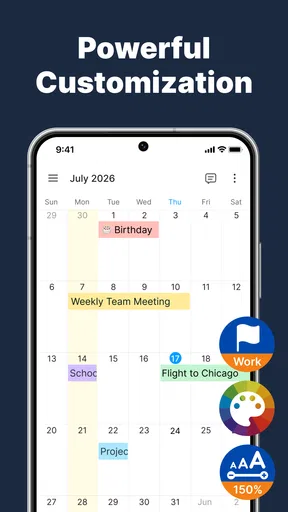
One of the standout features of this app is its customizable calendar views. Whether you prefer daily, weekly, or monthly layouts, Calendar Planner has you covered. You can also color-code events and tasks, which is a lifesaver for visual organizers like me.
Worth Reading Before You Choose

EA SPORTS FC Mobile 26 Is a Bigger Football Game, but It Takes Time

Flipboard Shows What News Apps Must Do Beyond the Feed

Switching to Android Auto Means Rethinking Your Driving Routine

Google Calendar Makes a Crowded Week Easier to Manage

Ludo King Makes the Most of the Minutes Between Plans

Baby Panda World Brings Quick Play to Modern Phones, but Its Game Library Feels Busy
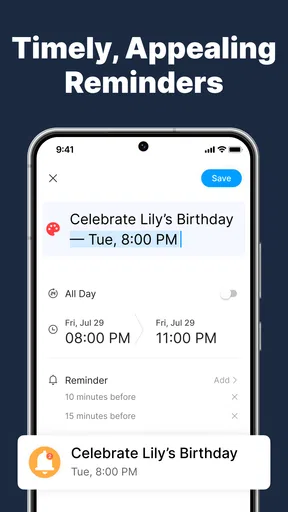
Another nifty feature is the integration with other apps. Syncing with Google Calendar, Outlook, and Apple Calendar is a breeze. This means you can pull all your events into one place without breaking a sweat. Plus, the app offers reminders and notifications that can be customized to your liking. Say goodbye to forgotten birthdays and missed deadlines!
Use the calendar without turning every day into a project
Color coding works best when the colors answer a real question. I would keep the system small: for example, distinguish work, personal commitments, and study rather than assigning a new shade to every kind of appointment. That makes the week easier to scan and avoids the common trap of spending more time maintaining categories than using the calendar. If I cannot explain what a color means at a glance, I would simplify it.
A useful routine is to check the monthly view for fixed commitments, then use the weekly view to decide where flexible tasks can fit. The daily view can be reserved for the day itself, when detail matters. This is a practical way to avoid crowding every screen with the same level of information. It also helps reveal a trade-off: placing a task beside an appointment makes the day feel concrete, but scheduling every small action can leave too little room for delays.
For someone coordinating work and home, I would use the calendar as a shared map of time rather than as a record of every private detail. Before relying on any shared arrangement, I would check who can see what and whether the setup suits the people involved. Calendar sharing can reduce the back-and-forth of arranging a meal or meeting, but it is only helpful when everyone is comfortable with the information being visible.
Task Management: A Game Changer
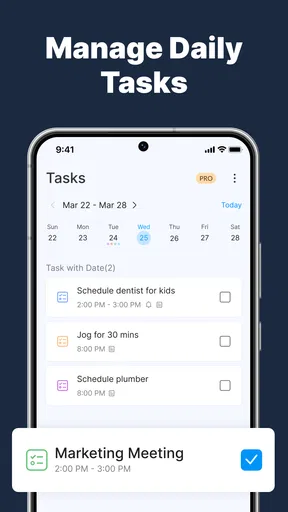
For those who love ticking off tasks, the built-in task manager is a real gem. It's simple, yet effective. You can set deadlines, prioritize tasks, and even break them down into subtasks. For someone like me who thrives on structure, this feature is a godsend.
The app also supports recurring tasks, which is perfect for those repetitive chores that sneak up on you. Setting up a weekly reminder for laundry? Done. Need an alert for your monthly book club? Easy peasy.
A realistic week: appointments, chores, and one deadline
Imagine a week with a work deadline, a regular class, a medical appointment, and household errands. I would put the fixed commitments on the calendar first, then add only the tasks that need a deadline or a specific day. Breaking the larger deadline into smaller steps can make it easier to see what can be done before the final due date. Recurring chores can sit in the same routine, but I would keep them flexible enough to move when an unexpectedly busy day arrives.
The key is to treat reminders as prompts, not as proof that the task will happen. A notification can bring an item back to mind, but it cannot make a packed afternoon realistic. When a day starts to look overloaded, I would move or remove low-priority tasks instead of adding more alerts. This is where a planner earns its keep: not by making every day look perfect, but by helping me notice conflicts early enough to adjust.
For students, the same approach can separate class times from assignment milestones without turning each subject into a complicated system. For a household, recurring tasks and shared plans can make routines easier to discuss. Freelancers may benefit from seeing client commitments beside admin tasks, though anyone who needs detailed project tracking may still want a specialist tool alongside the calendar.
Where a different kind of app may work better
Compared with a basic calendar, a combined planner can be more convenient when I want tasks and appointments in the same planning flow. A basic calendar may still be the better choice if it already handles my schedule reliably and I do not want another place to check. The benefit of consolidating is less app-hopping; the cost is that I need to learn a new routine and confirm that the information I care about is represented the way I expect.
A dedicated to-do app is often a better fit for long lists, detailed project planning, or people who organize work primarily by task rather than by date. A notes app is usually better for unstructured thoughts, reference material, or longer writing. I would not force all of those jobs into a calendar just to keep everything together. This planner is most convincing when time-based commitments and manageable daily tasks are the center of the problem.
There is also a difference between seeing an event in a connected calendar and having a dependable backup of your whole workflow. If your schedule is essential for work or caregiving, check that the calendars you rely on appear correctly and that reminders behave as you need before making this your only planning destination. I would keep the previous routine available during the transition and compare a few important entries rather than assuming that a new setup has transferred every habit perfectly.
Collaboration and Sharing
In today's world, collaboration is key, and this app gets it. You can share your calendar with friends, family, or coworkers with just a couple of taps. Planning group events or team meetings has never been easier. The app allows for real-time updates, so everyone stays in the loop. It's like having a digital assistant at your fingertips.
Switch gradually, and keep the setup simple
Switching planners has a hidden cost: the time spent recreating routines, deciding which calendar is authoritative, and teaching other people where to look. I would begin with upcoming commitments and recurring activities, then use the app alongside my existing method long enough to catch anything I missed. A short overlap is less elegant than an instant reset, but it is safer when other people depend on the schedule.
When sharing, I would agree on a simple convention first: who adds an event, how changes are communicated, and which calendar is the source of truth. Without that agreement, two people can both assume the other has updated the plan. For a one-off gathering, a shared calendar may be more structure than necessary; for regular family logistics or ongoing team coordination, a common view can be worthwhile if everyone checks it.
I would also resist importing every old task. Past reminders can clutter a fresh start and make it difficult to tell what is still relevant. Bring over active commitments, retain genuinely recurring items, and leave completed or stale plans behind. That small bit of housekeeping makes the new calendar more useful from the first week and reduces the chance that old entries will distract from current priorities.
Who should try it—and who should pass
I can see this being a good fit for someone who wants one approachable place to review a schedule, build routines, and keep everyday tasks tied to dates. It is especially sensible for visual planners who benefit from color distinctions and people who often forget chores or small commitments until they collide with something else. The free price makes it straightforward to try, while in-app purchases range from $1.99 to $48.99 per item, so I would check what is included before paying for anything.
I would hesitate to recommend it as the sole work system for someone managing complex projects, extensive documentation, or a team that needs detailed task ownership. A calendar can show when work is due, but that is not automatically the same as managing every step of the work. I would also skip it if I am already happy with my current calendar and rarely need a task list beside it; switching without a clear pain point can create more maintenance than value.
The app is free to download, is rated for Everyone, and is developed by Dairy App & Notes & Audio Editor & Voice Recorder. It has an average rating of 4.4 from around 47,000 ratings, with over 5 million installs. Those figures suggest it has reached a substantial audience, but they do not tell me whether its planning style will suit my habits; that is best judged by trying a real week rather than by popularity alone.
Final Thoughts: Is It Worth Your Time?
After spending a good chunk of time with Calendar Planner - Agenda App, I can confidently say it's a solid choice for anyone looking to streamline their schedule. The combination of a clean interface, powerful features, and seamless integration makes it a standout in the crowded world of productivity apps.
Whether you're a busy professional, a student, or just someone trying to keep their life in order, this app is worth a look. It might just become your new favorite tool for staying organized. So go ahead, give it a try, and see if it can help bring a little more order to your world.
Feeling ready to take the plunge? You can download Calendar Planner - Agenda App from the app store and start your journey towards a more organized life today!
My recommendation
My recommendation is to judge it by a simple test: after a week, can you find the next appointment quickly, remember the small tasks that tend to slip, and make a realistic plan without fussing over the setup? If yes, its combination of calendar views, reminders, and task organization may be exactly the kind of everyday support you need. If you keep returning to a separate task or notes tool for most of your work, that is useful evidence that a different app—or a deliberate combination—fits better.
Overall, I would try it as a practical planner rather than expecting it to replace every productivity tool. Keep the color scheme restrained, add only meaningful recurring tasks, and make sure shared plans are clear to everyone involved. With those habits, Calendar Planner can help bring appointments and routine responsibilities into view; without them, even a tidy interface can become another place to maintain.
Pros
- User-friendly interface for easy navigation.
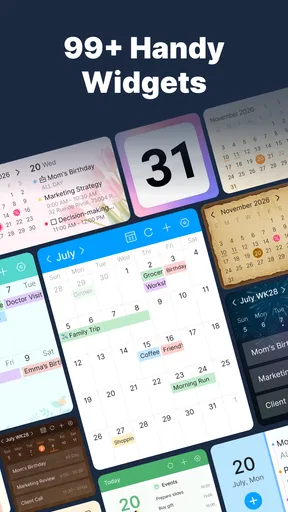
- Customizable themes for personalized experience.
- Syncs seamlessly with Google Calendar.
- Offers reminders for important tasks.
- Supports color-coding for better organization.
Cons
- Limited integration with third-party apps.
- Occasional syncing delays reported.
- Premium features require subscription.
- No offline mode for planning on-the-go.
- Lacks advanced task management tools.
FAQs for CalendPal: Calendar Planner
What features does the Calendar Planner - Agenda App offer?
The Calendar Planner - Agenda App offers a suite of features designed to enhance productivity. Users can create and manage events, set reminders, sync with other calendars, and share schedules with others. It also includes customizable views, allowing users to see daily, weekly, or monthly plans at a glance, and it integrates with task management tools for seamless planning.
Is the Calendar Planner - Agenda App available for both Android and iOS?
Yes, the Calendar Planner - Agenda App is available for download on both Android and iOS platforms. Users can find the app in the Google Play Store and the Apple App Store, ensuring compatibility with a wide range of devices. This cross-platform support allows for easy syncing and access to schedules anytime, anywhere.
Does the app support integration with other calendar services?
The app offers robust integration capabilities, allowing users to sync with popular calendar services such as Google Calendar, Outlook, and Apple Calendar. This integration ensures that users can consolidate all their scheduling information in one place, reducing the risk of missing important events or appointments.
Are there any in-app purchases or subscription fees?
While the basic version of the Calendar Planner - Agenda App is free to download, it offers in-app purchases and subscription options for additional features. These may include premium themes, advanced analytics, and enhanced collaboration tools. Users can choose to upgrade for a more comprehensive scheduling experience.
How secure is the Calendar Planner - Agenda App in terms of data privacy?
The Calendar Planner - Agenda App prioritizes user privacy and security. It employs encryption to protect all user data and complies with international data protection regulations. Users can rest assured that their personal and scheduling information is securely stored and only accessible to them and authorized devices.


